Feed on Posts or Comments

The Plaid Cow on 09 Dec 2008

A Blast from the Past

I got a notice the other day from iLounge saying there was a new reply to a post I was watching. And I though it was weird since I haven’t been reading that site since they changed the name from iPodLounge.

I turns out I would have been scared if I had remembered watching that thread–it was over five years since I had made what was the last post. (At least the new poster came back and apologized for not realizing the post was that old…)

, , The Plaid Cow on 06 Oct 2008

Meeting in the Past

I got a meeting change notices via my email program (Lotus Notes) this morning. Since it was a meeting I normally attended, I accepted and got this reply back from the organizer:

Note this was a change for last Friday.

Then why is Lotus Notes stupid enough to show me a change to a meeting that has already happened and let me accept it? Don’t answer that. I probably don’t want to know the answer. Apparently his sentiments are similar:

Because, otherwise, it just wouldn’t be Lotus Notes.

The Plaid Cow on 18 Sep 2008

The Count is Down to Five

If email is overwhelming your life and your inbox is out of control, I would highly recommend checking out the Inbox Zero series of posts on 43 Folders. It can make a huge difference in how you look at email. I don’t agree with everything that is presented, but it is cathartic to be able to have an empty (or near empty Inbox). If there are any emails which still need to be followed up on or replied to, they stay in the Inbox. I don’t trust that I will ever look at emails which are in a separate “To Process” box.

My main account is now down to five messages in the Inbox. (Once this Inbox is finished, I will be starting on the other two inboxes: 110 and 44 messages respectively.)

One day at a time. And the count keeps going down.

The Plaid Cow on 25 Aug 2008

Gateway from Hell

An issue today with a test site containing live site data (and testing the comment notifications) reminds me of the time I added 200 people to a Listserv and forgot to use the quiet option. So I got each and every response back. And then they were forwarded to my work account on Lotus Notes through a gateway from the internet. This was back in the spring of 1996, about a week after they setup the gateway in the first place. IT asked me if the number of messages was intentional and then politely asked me never to do that again.

, The Plaid Cow on 24 Aug 2008

Sorry, Message Has Already Been Deleted

If you’re trying to delete a message out of the Lotus Notes Webmail application, be sure to beware of the “the document has already been deleted” error:
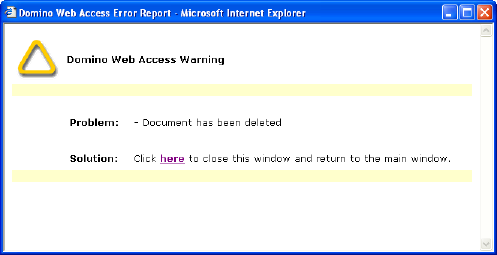
If I am trying to delete a message, and it’s already been deleted, don’t show me an error. Just say “great” and get on with life.

The Plaid Cow on 08 Jan 2008

Microsoft Excel AutoRecover Errors

In the process of upgrading my PC at work to XP, I changed the base directory that the the Microsoft Excel AutoRecover data was stored in. Actually I had forgotten that the AutoRecover data was stored there, but was reminded of this when I tried to change tabs in the “Options…” dialog:
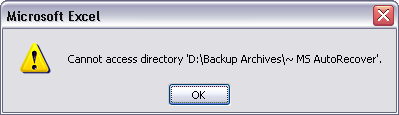
AutoRecover Error

This might seem innocuous, but the only direct way to change the directory is through the “Options…” dialog, and this error is shown instead of switching tabs in the dialog. This would not likely be an issue if any of the following were true of the design:

  • There was a way to change the directory from the error dialog.
  • A default directory was used in the case that the custom directory could not be used.
  • The “Options…” dialog could be opened without a document open.
  • The dialog switched tabs even though the error occurred.
  • The error could just be ignored.

Well, the last is partially true. The error is just ignored silently when starting up Excel. There is no warning that AutoRecover data is not being saved. This is probably why I missed is when I changed the directory name previously. Luckily, I’ve only been running this way a couple of weeks.

(Of note, I don’t have it pointing to a standard location like C:\Temp because one of the likely recovery scenarios is a power failure and there is a script that runs on login that deletes the temporary files. The logic of this can be debated separately.)

, The Plaid Cow on 23 Dec 2007

Error Reporting is Hard

Error reporting can be one of the most difficult things bout programming software. You’re trying to tell the user that something went wonky, but not send them into an all out panic. This excellent example (of how not to do error reporting) comes from Microsoft Outlook:

Error Dialog: "The item could not be moved. It was either already moved or deleted, or access was denied."

The first issue with this error is that I shouldn’t have gotten it. It comes up at least once a week when I delete the message from the index window while I still have the message open in a separate window and then I try to delete the message from the message window.

  • When I delete a message from the index, any windows in which it is open could be automatically closed.
  • When I try to delete a message from it’s window, if it’s not where you thought it was, check to see if it moved to the trash. If it is, great, just close the window without complaint. Otherwise you can report to the user that you’re incompetent and can’t keep track of the messages.

And why not tell me which one of the possibilities the actually error is.

  • It was already moved
  • It was already deleted
  • Access was denied

Aren’t you keeping track? Please try to pay attention.

The Plaid Cow on 18 Oct 2007

Try Deleting a Different File

I was trying to delete a file from a Windows network share at work when I got an interesting error:
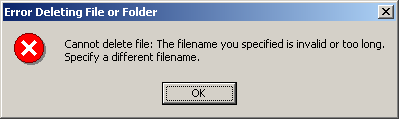
Cannot delete file: The filename you specified is invalid or too long. Specify a different filename.

Perhaps I should try deleting a different file?

Or, if you’re actually having this error, and trying to delete the file, it is likely that the filename is exceeding the maximum path length (for some reason). Try moving the files up a directory, and then deleting them.

The Plaid Cow on 04 Sep 2007

Easy Questions on the iPod Interface

After using the iPod for a while, I had a few questions about the interface. Give these a shot, in the comments, and I’ll post the correct answers in a few days.

  1. After pressing pause, you can press play to resume the current song.

  2. When listening to a playlist, at the beginning of a track, pressing the previous track button will take you to the previous track you heard.

  3. When listening to music, it is possible for the screen to be empty below the status bar.

The Plaid Cow on 12 Mar 2007

On the Outlook for Helpful Error Messages

I’m on the lookout for helpful error messages, like this one I got in Outlook:

Error Dialog

Next Page »